


Digital Record Keeping Guide
If you’re the personal representative of an estate, one of your most important jobs is collecting, organizing, and sharing documents. That means turning paper documents—like bills, account statements, and death certificates—into digital files (PDFs) that you can send safely and store forever. Don’t worry—it’s easier than you think, and we’ll walk you through every step.
Reviewed by Maxwell White, Esq. · Updated November 2026
1Get a Fast Scanner (or Use Your Phone)
We recommend a one-touch document scanner: the ScanSnap iX1300 if you’re scanning a few folders, or the ScanSnap iX2500 if you’re working through a full file box. Either one is fast, reliable, and easy to use. Plug it in, press one button, and it turns stacks of paper into clean, searchable PDFs in seconds.
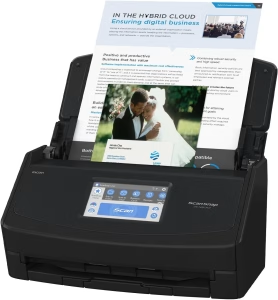
No scanner? For a handful of pages your phone is fine. Adobe Scan, Apple Notes, and Dropbox all produce a readable PDF. Buy a scanner only if you’re digitizing a full file box.
2Set It to Save as PDF
When setting up the scanner:
-
Choose “PDF” as the file format.
-
Set the scan quality to “Standard” or “Auto.”
-
Save the scanned files to a clearly labeled folder like “[Decedent’s Name] Estate Documents.”
If you’re not sure how to do this, don’t worry—the ScanSnap comes with a simple app that walks you through it.
3Scan the Right Documents
Here are some things you’ll likely need to scan:
-
The death certificate
-
The will and/or trust
-
Bank and investment statements
-
Mortgage or real estate papers
-
Credit card bills or debts
-
Life insurance policies
-
Tax documents
-
Anything your attorney asks for
If it looks important, scan it. You can always delete things later.
4Only Use the Clio Client Portal for Sharing
To keep your private documents safe, only send or receive documents using our secure Clio client portal. It’s like an online vault just for you and our law firm.
You’ll sign in at the Clio client portal. Once you’re in, you can upload scanned documents by dragging and dropping them. It’s simple, and we can help if you get stuck.
5Stay Organized
Keep all your scanned documents in one folder on your computer. Label everything clearly. For example:
-
“2023-09 Bank of America Checking.pdf”
-
“Life Insurance – John Hancock.pdf”
-
“Death Certificate.pdf”
This will make it easier when it’s time to prepare reports or respond to the court.
Need Help?
If you’re stuck or overwhelmed, call us at (443) 647-9009 or schedule a free consultation. We’re here to help you succeed in your role as personal representative, and digitizing your documents is a great place to start. You can also read about our Client Care Plan.